SuperTool consumer research · November 11, 2026 · U.S. edition
Stop Paying So Much for Ink: The Best Low-Cost Printers Over Five Years
The cheapest printer is the one you can afford to keep using. We compare four sensible laser and refillable-tank printers over five years, including the supplies that the sticker price leaves out.
A cheap printer can become an expensive commitment: small cartridges, repeated replacements, cleaning cycles, and another urgent trip for ink. The way out is to buy for your actual printing habits and calculate the next several thousand pages before buying the machine.
Our recommendation is straightforward: choose a monochrome laser for occasional black-and-white documents, or a refillable tank for regular printing that includes color. Keep a working, economical printer if you already own one. Buying nothing can be the best deal.
Affiliate and commercial disclosure: As an Amazon Associate I earn from qualifying purchases. Links labeled “Amazon listings” are affiliate links and may earn SuperTool a commission at no extra cost to you. SuperTool also operates the PDF and print-delivery services discussed below. Cost calculations use the separately cited manufacturer/retailer inputs—not Amazon price quotes. This is a research-based buying report, not a hands-on printer test.
The short list
The headline finding: the lowest-cost choice changes with your habits. Among these four models, the smaller Brother laser has the lowest five-year budget at 50 black-text pages a month (about $339); the Canon tank wins on modeled cost at 200 pages a month (about $510). For a familiar cartridge-printer comparison, read HP DeskJet vs. Brother Laser: When Ink Costs More Than a Printer.
- Best fit for occasional black-and-white printing: Brother HL-L2460DW. A compact, print-only laser with automatic two-sided printing. Toner avoids the liquid-ink drying problem; genuine replacements still deserve a cost check.
- Best fit for heavier black-and-white workloads: Brother HL-L5210DW. Its larger starter supply and high-capacity toner can repay the higher purchase price.
- Lowest modeled five-year cost here: Canon PIXMA G3270. A refillable color all-in-one for people who print regularly and can live without automatic duplexing.
- Tank alternative with automatic duplexing: Epson EcoTank ET-2980. Low bottle-ink costs, with a higher upfront price and a shorter model-specific ownership history.
These are recommendations for distinct uses, not a claim to have tested every printer or identified a universal winner. The two lasers do not print color or scan.
1. Buy five years of printing, not one cheap printer
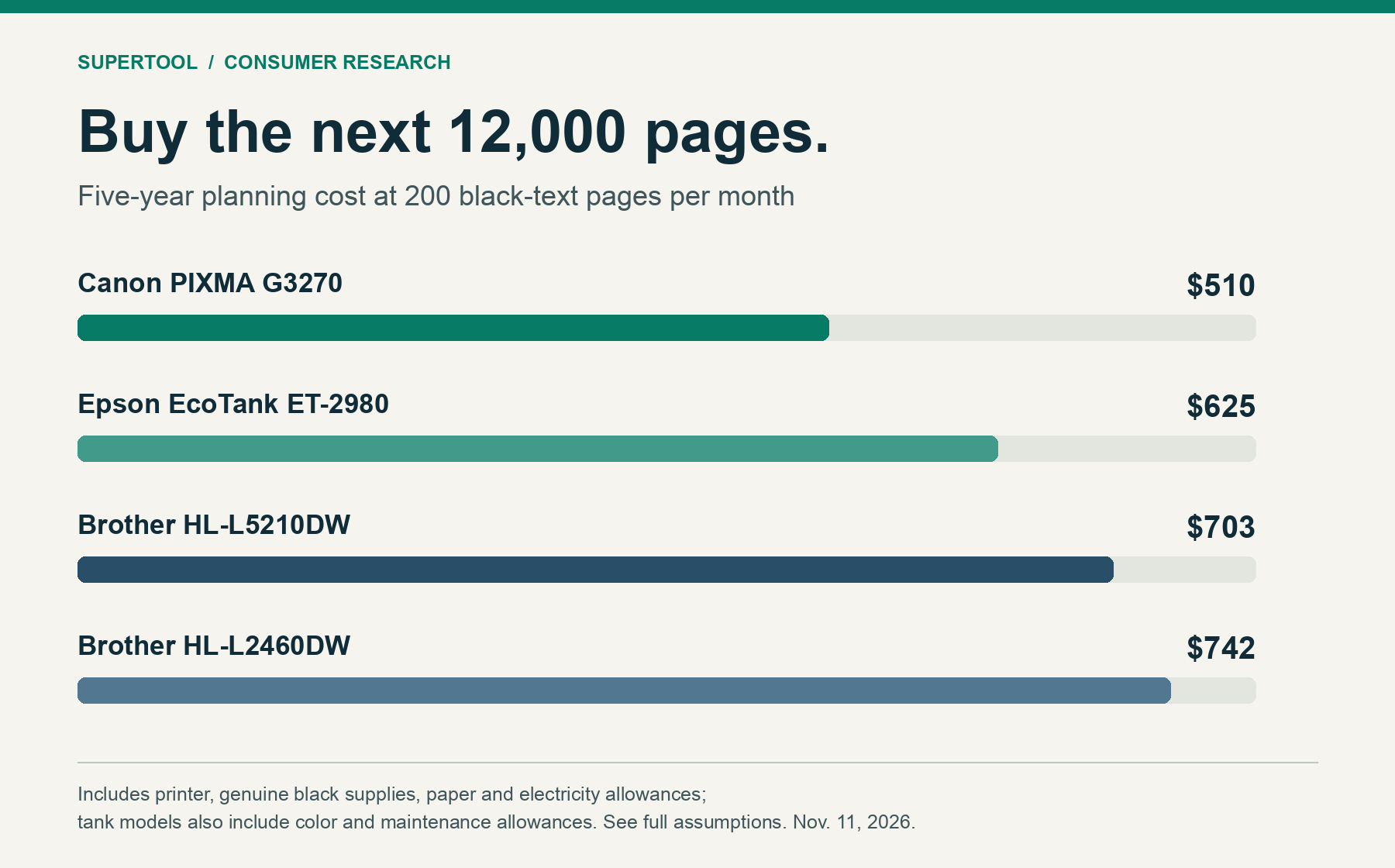
For our central household/home-office scenario, “normal use” means 200 black-text document pages per month: 12,000 printed sides over five years. That is an explicit planning choice, not a claim about the average American household. We also calculate 50 and 500 pages a month.
| Printer | 50 pages/month 3,000 total | 200 pages/month 12,000 total | 500 pages/month 30,000 total |
|---|---|---|---|
| Brother HL-L2460DW | $339 | $742 | $1,706 |
| Brother HL-L5210DW | $391 | $703 | $1,328 |
| Canon PIXMA G3270 | $356 | $510 | $795 |
| Epson EcoTank ET-2980 | $492 | $625 | $916 |
Includes paper at $6 per 500 sheets, a $25 five-year electricity allowance, and the supplies/reserves specified in Section 7. Simplex black-text workload; U.S. dollars; no subscription. Excludes tax, shipping, labor, unexpected repairs and premature replacement. Swipe the tables horizontally on a small screen.
The important result is the change in the ranking. The smaller Brother has the lowest purchase price and the lowest light-use budget. At 12,000 pages, the larger Brother costs about $39 less overall, despite costing $150 more upfront. At 30,000 pages, that modeled advantage grows to about $378, including one replacement drum for the smaller printer.
The tanks have the lowest supply expense. At normal use, the Canon’s total is about $232 below the smaller Brother’s, even with a full extra color set and a maintenance reserve budgeted for the Canon. That is a cost result, not proof that the Canon is the better printer for a house that prints once every few months.
What replacement supplies really cost per rated black page
| Printer / genuine black supply | Price input | Rated replacement yield | Black supply cost/page |
|---|---|---|---|
| HL-L2460DW / TN830XL [2] | $98.29 | 3,000 | 3.28¢ |
| HL-L5210DW / TN920XXL [4] | $204.29 | 11,000 | 1.86¢ |
| G3270 / GI-21 black [6] [7] | $22.99 | 6,000 | 0.38¢ |
| ET-2980 / Epson 502 black [9] [10] | $24.99 | 7,500 | 0.33¢ |
Laser does not automatically mean cheapest. It means toner instead of liquid ink. At these inputs, the smaller Brother’s genuine toner alone costs almost ten times as much per rated black page as Epson’s bottle ink. Convenience, idle tolerance, speed and maintenance still matter.
For perspective, HP rates its 67XL black cartridge at about 240 pages. Canon’s 6,000-page black replacement rating is 25 times that page count. These are manufacturer document-yield ratings under their respective methods—not equal ink volumes, photo yields or a prediction of what every household gets. [6] [11]
As an illustration, a $30 cartridge yielding 240 pages would cost 12.5¢ per rated black page, or $1,500 in replacement-supply value for 12,000 pages. The $30 is a hypothetical input, not a quoted HP or Amazon price. The calculation shows why cartridge price divided by yield is more revealing than a low printer price.
2. Four printers worth putting on your short list
Brother HL-L2460DW
Choose it if: you mostly print forms, shipping labels on suitable sheets, recipes or school paperwork, and the machine may sit idle between jobs.
Brother lists automatic duplexing, Ethernet, USB and wireless connectivity, with speeds up to 36 pages per minute. The standard box includes a 700-page starter toner and a DR830 drum rated around 15,000 pages. The separate drum is a future expense, not a reason to replace the whole printer. [1] [3]
The compromise: no scanner and no color. At our $98.29 TN830XL input, the machine’s small size does not translate into the lowest long-run toner bill. The standard model and “XL” bundles have different included supplies; compare the actual box contents.
Our verdict: the sensible default for a low-volume, document-only household. If you already have a healthy older Brother monochrome laser with affordable supplies, keep using it.
Compare HL-L2460DW Amazon listingsAffiliate link · Check exact model, new/refurbished condition, seller and included toner.
Brother HL-L5210DW
Choose it if: you print longer document batches and want to buy toner less often.
The standard package includes approximately 3,000 pages of toner and a 45,000-page DR920 drum. The TN920XXL replacement is rated for 11,000 pages. Brother lists automatic duplexing, Ethernet and wireless networking, with speeds up to 48 pages per minute. [4] [5]
The compromise: a bigger machine and a larger cash outlay for each high-capacity replacement. Our Brother-direct printer and XXL toner source pages showed out-of-stock status during research; do not pay a scarcity premium on the strength of this model. Recalculate using the genuine supply you can actually buy.
Our verdict: the stronger laser economics for the heavier workloads in this report. At only 50 pages a month, its larger included supply does not recover its higher upfront price within our five-year scenario.
Compare HL-L5210DW Amazon listingsAffiliate link · Confirm the model and toner compatibility; availability varies.
Canon PIXMA MegaTank G3270
Choose it if: you print regularly, need color worksheets or ordinary graphics, and are comfortable refilling bottles.
This print/scan/copy model uses GI-21 bottle ink. Canon’s default-mode replacement ratings are up to 6,000 black and 7,700 color pages. It has a flatbed scanner, a rear paper feed and manual two-sided printing. The black supply input is $22.99; a three-color replacement set is $44.97 at the cited Canon prices. [6] [7]
The compromise: no automatic duplexing or automatic document feeder. Cheap ink will not compensate for a paper-handling workflow you dislike. Ink used in initial setup reduces the included bottles’ printable yield; the model below explicitly discounts the starting black allowance.
Our verdict: the best cost case here for a household that will use a tank regularly. Announced in February 2023, it has more model-specific history than the ET-2980, although neither has a demonstrated five-year survival rate in our evidence. [16]
Compare G3270 Amazon listingsAffiliate link · Confirm G3270 features; similarly named tank models differ.
Epson EcoTank ET-2980
Choose it if: regular color printing and automatic two-sided output matter more than the lowest upfront price.
Epson lists a flatbed scanner, automatic duplexing, a 100-sheet paper tray and speeds of 15 black/8 color ISO pages per minute. It uses the established 502 bottle family. The black bottle costs $24.99 in our source snapshot, and three colors cost $50.97 together. [8] [9]
The compromise: this is still an inkjet, and Epson says all colors must be available for printing and maintenance. The ET-2980 launched in March 2025; a familiar ink family does not create five years of ownership evidence for this exact model. [8] [17]
Our verdict: a worthwhile step up from the Canon when automatic duplexing earns its place in your routine. Compare the current purchase-price gap rather than assuming the cheapest bottle ink guarantees the cheapest ownership.
Compare ET-2980 Amazon listingsAffiliate link · Check included bottles, seller and warranty eligibility.
3. What owners like—and what the reviews cannot prove
Owner reviews help expose daily annoyances that specifications miss. We used the linked Best Buy review pages, including visible individual reviews and the retailer’s labeled AI summaries. Ratings/counts below are retrieved research snapshots; cached pages and pooled variants can differ from the live listing. This is a qualitative synthesis, not a statistical analysis of every review.
| Model / rating snapshot | Positive themes | Concerns / evidence limits |
|---|---|---|
| HL-L2460DW 4.4/5 · 343 reviews [12] | Clear document text, manageable setup, compact size and two-sided printing. | Sleep/wake behavior appears among complaints. Some reviews describe features this print-only model lacks; those accounts are not feature evidence. |
| HL-L5210DW 4.0/5 · 1 review [13] | The one direct review liked setup, construction and document output. | Far too small a direct sample for a consensus. A separate 4.9/5 manufacturer-syndicated pool had 12 reviews; we do not combine the two. |
| G3270 4.4/5 · 406 reviews [14] | Everyday print quality, bottle filling and worksheet use; individual reviewers also like color output. | External paper feed, noise and the small control display are practical friction points. Early impressions do not establish lifetime savings. |
| ET-2980 4.5/5 · 468 reviews [15] | Print quality, setup and wireless convenience are favorable themes in the retailer’s summary. | Negative owner reports include setup/connection or operation problems. A relatively young model has limited long-term evidence. |
Many displayed reviews are marked incentivized, and some ownership periods are only weeks or months. We therefore do not convert star ratings into failure probabilities or call these printers “proven to last five years.” Read recent low-star reviews, check that they concern the exact model, and buy with a practical return route.
4. “Tried and true” means serviceable, supported and suited to your habits
The strongest longevity recommendation is a modest one: buy a mature printing approach with obtainable consumables and replaceable wear parts, then keep the machine as long as it works well. Our evidence does not establish a defensible median lifespan or five-year survival percentage for these four models.
- For long idle periods, favor toner. Dry toner avoids an inkjet’s liquid-ink/nozzle drying mechanism. It does not prevent paper-feed, networking or other mechanical failures.
- For a tank, follow the maker’s maintenance guidance. Use it regularly, keep the required colors available, and avoid treating repeated deep-cleaning cycles as a free fix. Epson explicitly warns that infrequent printing can lower yields. [8]
- Check the wear parts before buying. Brother’s separate drums are rated components, not printer lifespan claims. Canon identifies the G3270’s heads and maintenance cartridge as customer replaceable; Epson lists a compatible T04D1 maintenance box. Availability and price still need checking when service is needed. [3] [5] [18] [19]
- Keep a stable connection option. USB, Ethernet where available, and supported standard printing paths can be valuable when a mobile app or Wi-Fi setup becomes frustrating. Check current operating-system support before purchase.
For a used laser, ask for a page-count report, a clean sample print and the drum/maintenance status. A bargain machine needing several wear parts may not be a bargain. Conversely, replacing a healthy older printer solely to save a fraction of a cent per page may never recover its purchase cost at your volume.
5. Escape the expensive-cartridge model without joining another trap
The consumer problem is recurring cost and lost choice—not the existence of ink. Refillable ink is one of the useful alternatives. A small black cartridge, a large toner cartridge and a bottle should all face the same question: how much usable printing does the next dollar buy?
- Price the replacement before the printer. Write down the exact supply SKU, genuine price, rated yield and whether a drum is separate. “XL” alone tells you little.
- Choose subscriptions deliberately. A predictable page plan may suit some users; occasional printers may pay for unused capacity. Compare 60 months of fees, overages, cancellation terms and any connectivity requirements. Our figures use retail supplies and no subscription.
- Read cancellation rules. Brother’s Refresh terms state that subscription cartridges are deactivated after cancellation and must be replaced to continue printing. Ordinary retail supplies and subscription supplies are different purchasing arrangements. [2]
- Do not base your purchase on the cheapest compatible cartridge listing. Third-party supplies may reduce costs, but quality, chips, firmware compatibility and seller support vary. This report’s base case uses genuine supplies so the savings do not depend on an unverified workaround.
- Keep security updates in perspective. Do not disable updates by default to protect speculative cartridge savings. Review current compatibility and security guidance for the exact model.
A color laser can make sense for office throughput and idle tolerance, but it brings multiple toner colors and potentially other wear parts. We have not costed one here and would not infer a low color cost from a low monochrome toner figure. For regular household color documents, the two tanks are the more relevant alternatives in this short list.
6. Spend less before replacing the printer you already own
Find the right tool for your printing problem: visit the SuperTool printing and ink-saving hub for PrintLight, faint-text fixes, color changes, page preparation and print delivery.
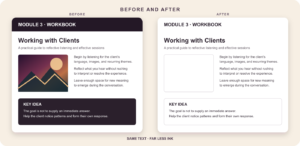
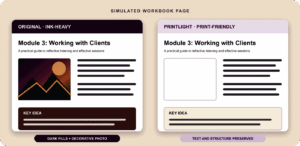
Printer choice is only part of the bill. A PDF with a dark background or large photographs can consume far more marking material than a simple letter. Check a representative page before committing to a long run; preserve charts, small text and barcodes that need full readability.
Lighten ink-heavy PDFs
PrintLight PDF can lighten heavy panels and omit large photos while retaining useful content where possible. Preview the result before downloading and printing. Savings depend on the document and settings; we have not applied a measured savings percentage to this cost model.
Make a PDF printer-friendlyNeed paper, not a printer?
HardCopy by SuperTool offers document printing and delivery. For occasional batches, compare its complete quote with buying and maintaining a printer. Upload your PDF and review ZIP-specific pricing and delivery options. It is a paid service, and we do not assume it is always cheaper.
Get a print & delivery quoteBlack ink has run out?
Read our print-without-black-ink guide and, where appropriate, recolor a PDF to use available color ink. This is a temporary option only if your printer allows it. Recoloring cannot override a cartridge-empty lockout, and some printers still use black during color printing.
See the black-ink optionsFor PDFs whose color is unnecessary, convert a copy to black and white and choose the printer’s appropriate black-only or monochrome setting. A grayscale file alone does not guarantee that a color inkjet uses only black ink. For an emergency color substitute, see the PDF Colorizer.
Use duplexing when the job permits it. Twelve thousand one-sided pages use 12,000 sheets; perfect duplex pairing uses 6,000. At our $6-per-ream assumption, that saves $72 in paper over five years, before allowing for odd-length jobs and reprints. It does not halve ink or toner consumption because both sides still get printed.
The practical buying rule: occasional black-and-white documents point toward a modest laser; frequent color documents point toward a refillable tank. Check the whole five-year bill, keep a serviceable machine, and stop paying to reproduce backgrounds you do not need.
7. Methods, exact inputs and limitations
Research date: November 11, 2026. Geography/currency: U.S./USD. Inputs are dated planning values from the linked sources; they are not five-year price guarantees or live Amazon offers. Manufacturer-direct prices are used except for the Canon printer’s $199.99 Staples input. Discounts, bundles and stock changes can alter the ranking.
| Model | Printer price | Starting black page credit | Extra allowances / drum |
|---|---|---|---|
| HL-L2460DW [1] | $179.99 | 700 | Included 15,000-page drum; $157.99 replacement when needed. [3] |
| HL-L5210DW [5] | $329.99 | 3,000 | Included 45,000-page drum; no drum replacement within these scenarios. |
| G3270 [20] | $199.99 | 4,800 (assumption) | $44.97 for one extra CMY set; $50 maintenance reserve. |
| ET-2980 [8] | $329.99 | 6,000 (assumption) | $50.97 for one extra CMY set; $50 maintenance reserve. |
Starting tank ink: we credit 80% of the replacement black yield for both tanks to allow for initial filling and uncertainty. This is an editorial assumption, not a manufacturer measurement of the included bottles. Epson advertises included yields of up to 6,600 black/5,500 color pages; we do not use that black figure in the model. Canon warns that initial setup reduces included-bottle yield. [6] [8]
Color and maintenance: even the monochrome tank scenario budgets one entire extra set of cyan, magenta and yellow bottles because maintaining a color inkjet is not free. It also includes $50 for maintenance consumables. Those are explicit allowances, not predictions of cleaning consumption or repair coverage. Additional color printing may need more ink. Neither allowance establishes a service interval.
Paper and power: paper is budgeted at $6 per 500 sheets, with one sheet per printed page; $25 is a common five-year electricity allowance. Both are chosen planning inputs, not measured printer-specific operating costs. Apply your own paper price, electricity rate, duplex mix and idle settings. Toner models’ rated speeds and ISO inkjet speeds are not directly interchangeable benchmarks.
Whole-unit arithmetic: pages = monthly volume × 60. Black refills = round up [max(0, pages − starting black credit) ÷ replacement yield]. Cost = printer + purchased black refills + needed drums + color allowance + maintenance allowance + paper + power allowance. An included drum is replaced only when printing beyond its rated capacity, not immediately after the final page. Unused toner/ink has no resale credit.
| Model | Black refills purchased | Printer + supplies + maintenance | Paper + power | Total |
|---|---|---|---|---|
| Brother HL-L2460DW | 4 · $393.16 | $573.15 | $169.00 | $742.15 |
| Brother HL-L5210DW | 1 · $204.29 | $534.28 | $169.00 | $703.28 |
| Canon PIXMA G3270 | 2 · $45.98 | $340.94 | $169.00 | $509.94 |
| Epson EcoTank ET-2980 | 1 · $24.99 | $455.95 | $169.00 | $624.95 |
Lower-yield stress case: reducing both the starting black credit and replacement black yield to 70% raises the 12,000-page budgets to about $939 (HL-L2460DW), $908 (HL-L5210DW), $533 (G3270) and $650 (ET-2980). Color, maintenance, drum, paper and power assumptions stay fixed. This isolates black-yield risk; it is not a prediction or a complete worst case.
Limits: this is a modeled document-printing comparison using published yield methods, not a measurement of ink volume, photographic coverage, image quality or real-world failure rates. It assumes a serviceable printer for five years and does not include sales tax, shipping, user time, unexpected repairs, financing, inflation or residual value. Photo-heavy work, long idle periods, deep cleaning, damage and changing supply prices can move costs materially. No unmeasured PrintLight discount or third-party-supply saving is built into the totals.
Sources and evidence
Primary manufacturer product/consumable documentation supplies specifications and prices; retailer pages supply their own prices and owner-review snapshots. Accessed or retrieved for this report November 11, 2026. Source pages may change.
- Brother HL-L2460DW — price, features, standard box contents.
- Brother TN830XL — $98.29, 3,000-page rating, yield method and Refresh cancellation terms.
- Brother DR830 — $157.99, approximately 15,000 pages and yield conditions.
- Brother TN920XXL — $204.29, 11,000-page rating and stock snapshot.
- Brother HL-L5210DW — $329.99, 3,000-page included toner, 45,000-page included drum, features and stock snapshot.
- Canon G3270 specifications and yield notes and Canon brochure — default-mode yields and hardware features.
- Canon GI-21 black and G3270 compatible supplies — $22.99 black and $14.99 per color inputs.
- Epson ET-2980 — $329.99, features, included-yield and all-color maintenance caveats.
- Epson ET-2980 ink compatibility and bottle prices — 502 black $24.99; colors $16.99 each.
- Epson 502 bottle yield reference — 7,500 black/6,000 color; same bottle family, with printer/usage-dependent actual yield. ET-2980 compatibility is established separately in source 9.
- HP 67XL black — approximately 240-page rating. No HP retail price is used.
- Best Buy HL-L2460DW owner reviews — rating snapshot, individual accounts, retailer summary and incentive labels.
- Best Buy HL-L5210DW reviews — one direct review and separately displayed manufacturer-syndicated pool.
- Best Buy G3270 owner reviews — rating snapshot, individual reviews and retailer summary.
- Best Buy ET-2980 owner reviews — rating snapshot, owner reports and labeled retailer summary.
- Canon’s February 8, 2023 announcement — G3270 model introduction.
- Epson’s March 27, 2025 announcement — ET-2980 introduction. Launch MSRP differs from our later product-page input.
- Canon MC-G04 and maintenance replacement instructions — user-replaceable maintenance cartridge.
- Epson T04D1 maintenance box — ET-2980 compatibility.
- Staples Canon G3270 — $199.99 printer input; stock, offers and prices may change.
Editorial accountability: recommendations follow the stated workload and cost model. Affiliate availability is not evidence of reliability. Recalculate with the actual seller’s price and box contents before buying.